SI 699 · UCAD Final Project

ACCESS U-M

A mobile app that empowers the U-M community to report accessibility barriers easily.

University of Michigan · Disability Equity Office

Rachel Gonzalo · Kelvin Chang · Ben Tsai · Zichen Zang · Lily Madojemu · Andy Xu

What’s the Problem?

Imagine this: While heading between classes, you encounter cracked, uneven sidewalks that are difficult to navigate in a wheelchair. The delay causes you to arrive late to class.

Or picture this: You are trying to register for a campus event online, but the form does not work with your screen reader. You email someone and you hope they respond in time.

These events happen every day across the University of Michigan’s campus. While there is currently an online reporting form, it lacks features such as geolocation and photograph capture. This makes it harder for users to report issues in the moment and for the Disability Equity Office to accurately track and respond to them.
Why It’s a Problem

Limited visibility

The current online form did not record precise location, limiting the Disability Equity Office’s visibility into where barriers were across campus.

Hard to track barriers

Without location-specific, mobile-friendly reporting, barriers were harder to track, and people had no quick, direct way to report issues.

Meet people where they are

The DEO needed a mobile-friendly reporting tool that made reporting easier and provided actionable location data.

Problem Statement

The existing web reporting process did not provide a mobile-friendly, centralized way for the U-M community or visitors to report physical and digital accessibility barriers in real time with precise location data.

Our Solution

A mobile app that enables real-time reporting of accessibility barriers. It uses geolocation and photos to capture precise barrier context.

The app in action

  1. Report barriers in the moment.
  2. Capture location and visual context in real time.
  3. Stay connected after reporting.

UX Process

Multi-platform testing

Ran testing on iOS, Android, and various screen sizes, ensuring the experience is consistent across platforms and devices.

Design system

Established a shared design system early on. Defined colors, fonts, and components to ensure visual consistency and reusable, sustainable development.

Design as we build

Integrates design into the agile workflow, supporting efficiency and rapid iteration.

Design iteration

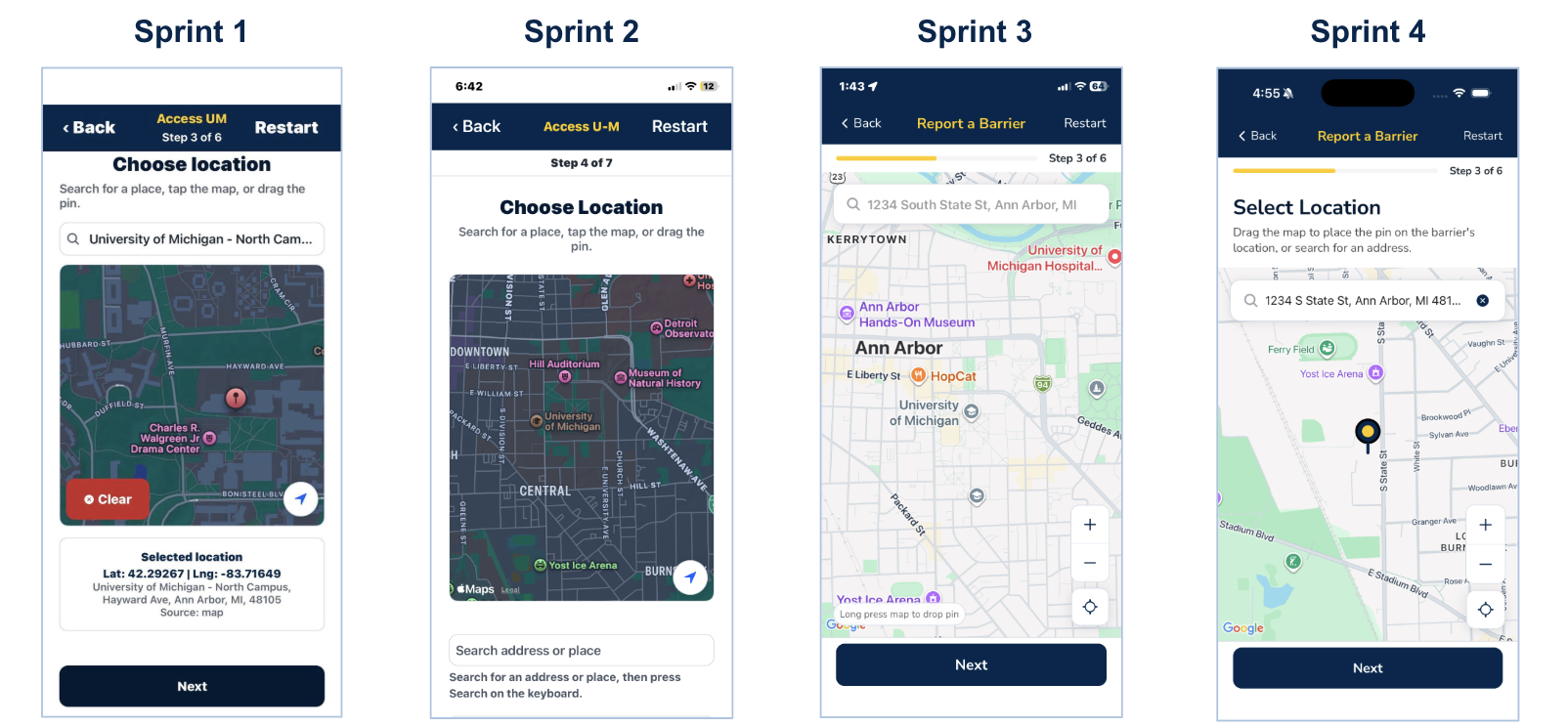
Sprint 1 through Sprint 4 refined the location step: early screens used a dark map with technical coordinate readouts; later sprints moved to a lighter map-first layout under Report a Barrier, with clearer titles, search placement, progress, and instructions for placing the pin.

Four Access U-M phone mockups in a row, Sprint 1 through Sprint 4, showing the location step evolving from dark map with coordinates to light map with Report a Barrier, search, progress, and pin placement.
Sprint 1–4: location and map UX progression for ACCESS U-M.

Client Collaboration

Process tips

  • Internal team meetings a day before the client meeting.
  • Finish assigned tasks early and push to GitHub so the team can test and build on top of it.
  • Double-check that all tasks are done before completing a sprint.

Agile Process

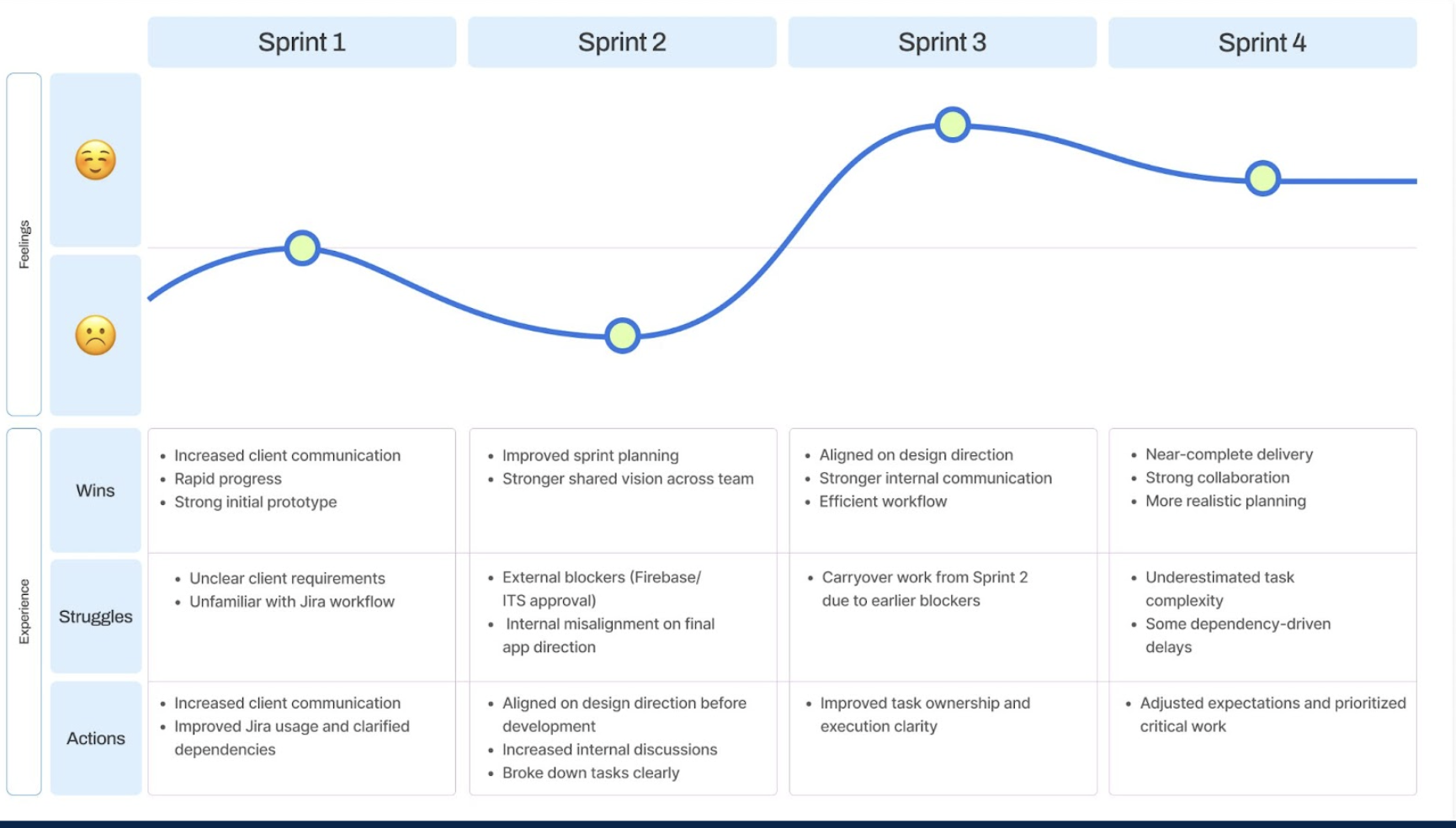
Team sprint retrospective chart across four sprints with a blue “feelings” line that rises in Sprint 1, dips in Sprint 2, peaks in Sprint 3, then slightly declines and levels in Sprint 4. Below, a table lists Wins, Struggles, and Actions for each sprint: Wins include increased client communication, rapid progress, improved planning, shared vision, aligned design direction, stronger internal communication, efficient workflow, near-complete delivery, strong collaboration, and more realistic planning. Struggles include unclear client requirements, unfamiliar Jira workflow, external blockers (Firebase/ITS approval), internal misalignment on app direction, carryover work, underestimated task complexity, and dependency-driven delays. Actions include increasing client communication, improving Jira usage and clarifying dependencies, aligning on design before development, breaking down tasks, improving task ownership/execution clarity, and adjusting expectations to prioritize critical work.

Work was organized with Jira stories and a product backlog. The team followed an agile journey with sprint-based design iteration (Sprints 1–4).

Tech tip

Team communication before GitHub merging = success.

Development Process

Key aspects

Geolocation — Provides the location of the physical barrier users are reporting.

Photo upload — Enables the capture and storing of images to show what the barrier is.

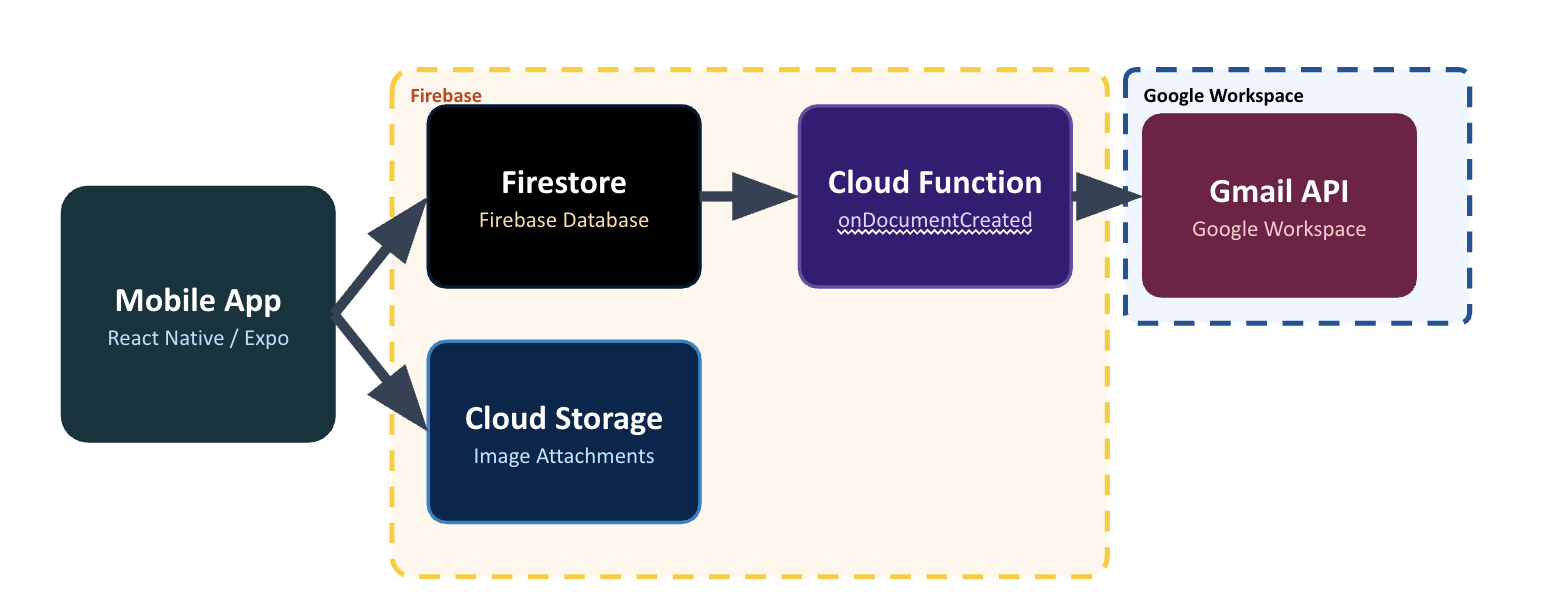
Backend architecture

Backend architecture: Mobile App (React Native / Expo) connects to Firebase (Firestore, Cloud Storage, Cloud Function onDocumentCreated); Cloud Function connects to Gmail API in Google Workspace.
Mobile app → Firebase (Firestore, Cloud Storage, Cloud Function) → Gmail API.


  • Mobile app: React Native / Expo
  • Firestore — Firebase database
  • Cloud Storage — Image attachments
  • Cloud Function — onDocumentCreated
  • Gmail API — Google Workspace email notifications

Data flow: App writes a new report to Firestore and uploads an image to Cloud Storage → onDocumentCreated fires a Cloud Function → email notification is sent via the Gmail API.

Tech Stack

React Native Firebase Expo Go
  • React Native
  • Firebase
  • Expo Go

Outcomes & Impact

ACCESS U-M is a fully functional mobile app being deployed to the Apple App Store and Google Play Store. Once live, any student, faculty member, or visitor at U-M will be able to download it for free and begin reporting barriers immediately.

  • Empowers everyone — Turns every person on campus into an accessibility advocate.
  • Drives data & action — Creates a direct channel of communication.
  • Builds a more inclusive U-M — Informs decisions to make campus spaces, services, and digital tools work for everyone.

While traditional barrier reporting relies on outdated web forms and phone calls, ACCESS U-M empowers users to report accessibility barriers in seconds: turning silent frustrations into campus-wide change.

Proudest Accomplishment

Starting to publish an app!

Video

Here's a video about Access U-M!

ACCESS U-M

Reporting accessibility barriers in seconds.

Access U-M

Available on the App Store & Google Play soon.